

Pod security posts usually describe the target state: every namespace on restricted, default-deny everywhere, every container read-only and non-root. I wanted to write about the real state of my cluster instead, so I measured it on the morning of 20 November.
One namespace enforced restricted. Five enforced baseline and only warned about restricted, and three were privileged. Two of the namespaces that sit in front of every app, the gateway and the certificate issuer, had no NetworkPolicies at all.
By the evening, six namespaces enforced restricted and both of those namespaces denied by default. This post is that day: the before and after numbers, why most of it cost nothing, the one subtle rule each new policy needed, and the namespaces that can’t be locked down, with the reason for each.
The morning audit #
| Measure | Morning of 20 Nov | Evening of 20 Nov |
|---|---|---|
Namespaces enforcing restricted |
1 (databases) |
6 |
Namespaces enforcing baseline |
5 | 0 |
Namespaces privileged |
3 | 3 |
| NetworkPolicies | 20, in 5 namespaces | 28, in 7 |
| Namespaces denying all traffic by default | 4 | 6 |
The container numbers didn’t move much, because none of the changes touched an app. Of the 60 running containers, 36 have a read-only root filesystem, 30 declare runAsNonRoot, 39 drop all capabilities, and 4 run privileged. Every container in apps, argocd, cert-manager and databases does all three.
The question the numbers raised was obvious: if the apps already meet restricted, why weren’t they enforcing it?
Flipping apps cost nothing
#
Pod Security Admission has three modes per namespace: enforce refuses a pod, warn lets it run and prints a warning, and audit writes it to the audit log. The apps namespace had enforced baseline and warned on restricted since part 13, as a safe default while apps were moving in.
Before changing it, a server-side dry run shows exactly what restricted would reject, without changing anything:
kubectl label --dry-run=server --overwrite ns apps pod-security.kubernetes.io/enforce=restrictedIt printed no warnings. All eight app workloads, five Deployments, CouchDB and two backup CronJobs, already complied. To make sure the silence meant “nothing fails” and not “nothing checked”, I ran the same dry run on argocd, and it did warn. Then the label changed:
metadata:
  name: apps
  labels:
    # Every app passed restricted on 20 Nov 2026 (server dry run, no warnings),
    # so a new app that doesn't is refused instead of only warned about.
    pod-security.kubernetes.io/enforce: restricted
    pod-security.kubernetes.io/warn: restricted
    pod-security.kubernetes.io/audit: restricted
The reason it was free is the real lesson. Each app had been hardened as it moved onto the cluster: the shared app template sets non-root, no privilege escalation, all capabilities dropped and a read-only root filesystem. The cost of restricted was paid app by app during the migration, so turning it on at the end was a label change. If I’d planned to harden everything at the end, this would have been a week of work.
The same dry run on cert-manager, gateway-system and platform (which has no pods yet) was also clean, so they changed the same way. platform matters even when it’s empty: the first pod ever deployed there now has to comply.
argocd failed on one container, and it was mine: the KSOPS sidecar I added for SOPS decryption (part 7) didn’t drop capabilities or set a seccomp profile. The upstream ArgoCD containers already complied. Two fields fixed it:
          drop: [ALL]
        seccompProfile:
          type: RuntimeDefault
After an ArgoCD upgrade with the new values, I forced a full refresh of an app with an encrypted secret, and it still decrypted and came back Synced and Healthy. The bootstrap task now sets restricted on argocd too, so a rebuild keeps it.
One consequence to know about: in these namespaces, an upgrade whose new pods don’t meet restricted is refused rather than rolled out. The Deployment looks stuck, and the reason is in the ReplicaSet’s events. That note now sits in the namespace definitions, where someone debugging a stuck Renovate update will find it.
Reference: Kubernetes security in my knowledge base covers the Pod Security Standards levels and the three admission modes.
Default-deny for the gateway and the issuer #
The gateway and cert-manager sit in front of everything, and before 20 November nothing limited their own traffic. A compromised Envoy or cert-manager pod could open connections to the home LAN, the hypervisor, the tailnet and the internet. The databases were shielded only by their own namespace’s policy, which accepts the apps namespace and nothing else.
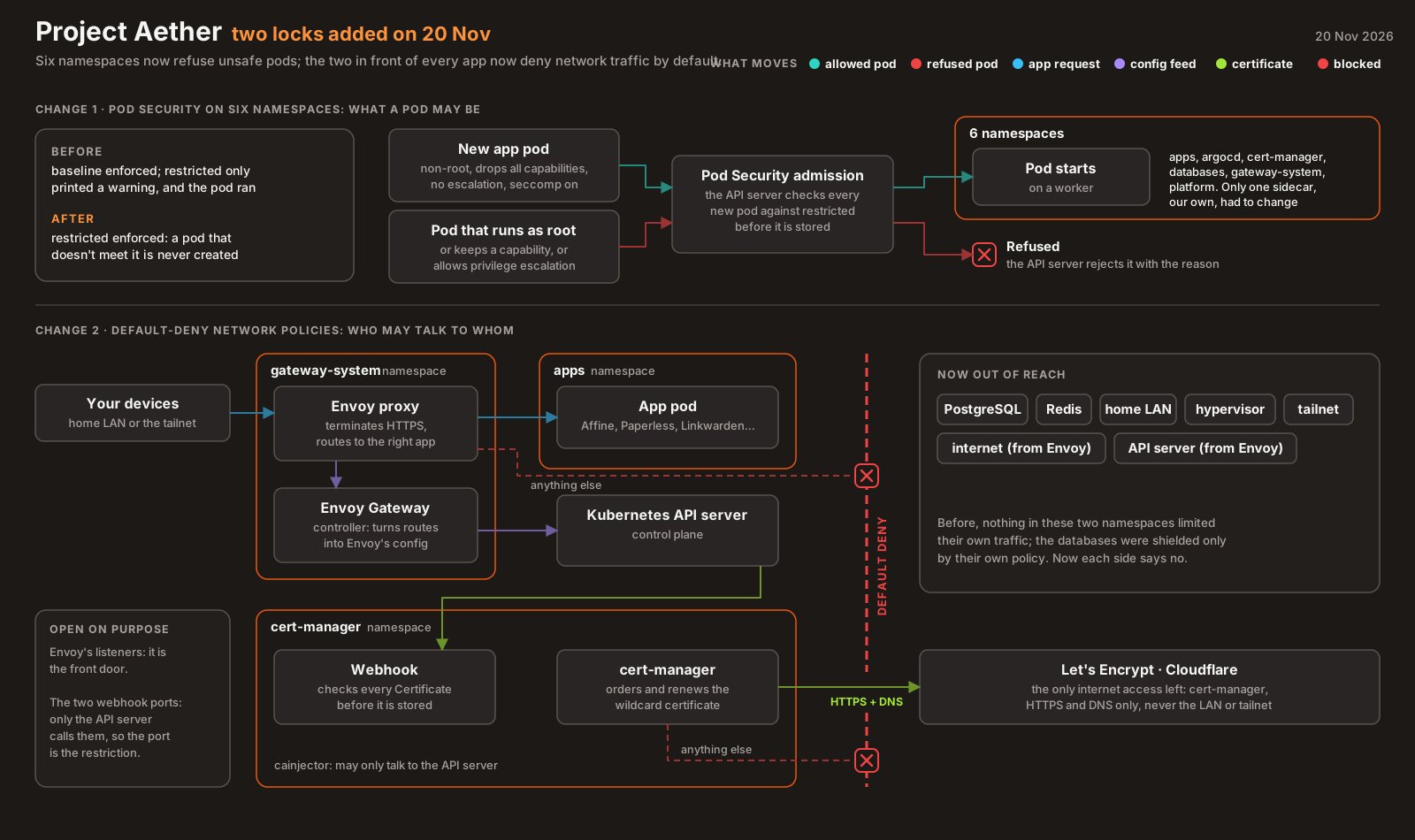
The gateway. The Envoy proxy accepts anyone on its listeners, because it’s the front door. It can reach only the apps namespace, its controller’s config feed and DNS. The Envoy Gateway controller accepts only the proxy and the API server, and reaches only the API server and DNS.
cert-manager has three pods, and each got exactly what it needs. All three may use DNS and the API server. The webhook accepts calls from the API server. The controller may reach the public internet, for the Cloudflare API and Let’s Encrypt, on HTTPS and DNS only, and nothing private:
  egress:
    - to:
        - ipBlock:
            cidr: 0.0.0.0/0
            except: [ … ]   # every private range: pods, services, the home LAN, the tailnet, link-local
      ports:
        - { protocol: TCP, port: 443 }
        - { protocol: UDP, port: 53 }
        - { protocol: TCP, port: 53 }
Each policy had one rule that was easy to get wrong.
- DNS-01 doesn’t only use cluster DNS. Before cert-manager asks Let’s Encrypt to validate, it checks that the TXT record is visible by asking the zone’s authoritative nameservers directly. Allow only CoreDNS and certificates silently stop renewing. Hence port 53 to the internet, for the controller only.
- The webhook can’t be restricted by source. The API server’s calls arrive from the control node’s LAN address or its overlay address, depending on the path, so the port is the restriction. And the webhook runs with
failurePolicy: Fail: if the policy blocks it, every Certificate and Issuer change is rejected.
Both were tested before committing. A staging certificate was issued end to end in about 100 seconds, and a fresh Envoy pod fetched its config and served every app over the LAN and the tailnet. Then I ran a probe pod with each component’s labels: it reached what the policy allows and nothing else. For Envoy, PostgreSQL, the API server, the LAN, the tailnet and the internet were all blocked.
Reference: Network policies in my knowledge base covers selectors, ipBlock, and the default-deny pattern step by step.
The three that stay privileged #
Three namespaces still enforce privileged, and kube-system belongs to K3s. I’d rather explain them than add policies that look good and do nothing:
| Namespace | What needs host access | Why |
|---|---|---|
metallb-system |
The speakers | Host network and network capabilities, to announce the gateway’s address on the LAN. The controller lacks only a seccomp profile |
monitoring |
Node exporter, Alloy, kube-state-metrics | Host PID and host paths for node metrics; host paths to read pod logs; host network so Prometheus can reach kube-state-metrics over the node’s tailnet name |
tailscale |
The tailnet gateway proxy | Privileged, to route traffic into the mesh. The operator and its other proxy run as root |
kube-system |
The NFS storage driver (3 containers) | Privileged, to mount NFS volumes on the node |
tailscale and metallb-system also have no NetworkPolicies, on purpose: their pods use the host network or raw sockets, where NetworkPolicy barely applies (part 15 explains why). A policy there would be documentation, not enforcement.
Everything that stays privileged is node-level plumbing, the load balancer, the storage driver, node metrics and the mesh, not apps. Every namespace that runs ordinary workloads now enforces restricted.
What I learned #
- Harden as you migrate, not at the end. Turning on
restrictedfor the apps was a label change because each app met it as it moved in. (80a9cba) - Dry-run the policy on the server, and check that the dry run can fail. A clean result means something only if the same check warns somewhere else.
- Your own additions are often the ones that fail. The upstream ArgoCD containers complied. My sidecar didn’t.
- DNS-01 talks to the internet’s DNS, not just CoreDNS. A cert-manager egress policy has to allow it. (
332dbf2) - Test the policy from the pod’s identity. A probe with the component’s labels shows what the policy really allows. (
2bf5b23) - Don’t write a policy that can’t apply. For host-network pods, say why there isn’t one.
Architecture takeaways #
Why Pod Security is per namespace, with three modes #
Pod Security Admission replaced PodSecurityPolicy with something deliberately simple: three fixed levels, set by labels on a namespace. The namespace is the unit because it’s already the unit of ownership: one team, one app, one set of permissions. The three modes exist for exactly the path I took. warn and audit show what restricted would reject while nothing breaks, and enforce is a one-label change once the warnings are gone. The server-side dry run is the same check, run against everything already in the namespace.
Why NetworkPolicy is allow-only and starts from open #
A pod with no policy selecting it accepts everything, so that installing a NetworkPolicy controller never breaks a running cluster. Once any policy selects a pod, only what some policy allows gets through, and policies can only add allowances, never subtract them. That’s why the pattern is a default-deny policy that selects every pod in the namespace, followed by one small allow policy per real flow. Each allow is then a documented dependency: the controller needs the internet’s DNS, the webhook needs the API server, Envoy needs the apps. Reading the policies tells you how the namespace actually works.
Previous: Drift Detection in a Public Repo, Without a Single Stored Key · All posts in the series