

Updated 16 Nov 2026: rewritten. The original’s length and capacity numbers didn’t match its own code and diagram; this version fixes them and adds the append-aliasing pitfall, nil slices and copy.
A slice is Go’s everyday list. You’ll use slices far more than arrays, because they can grow and because passing one to a function doesn’t copy its elements.
What a slice is #
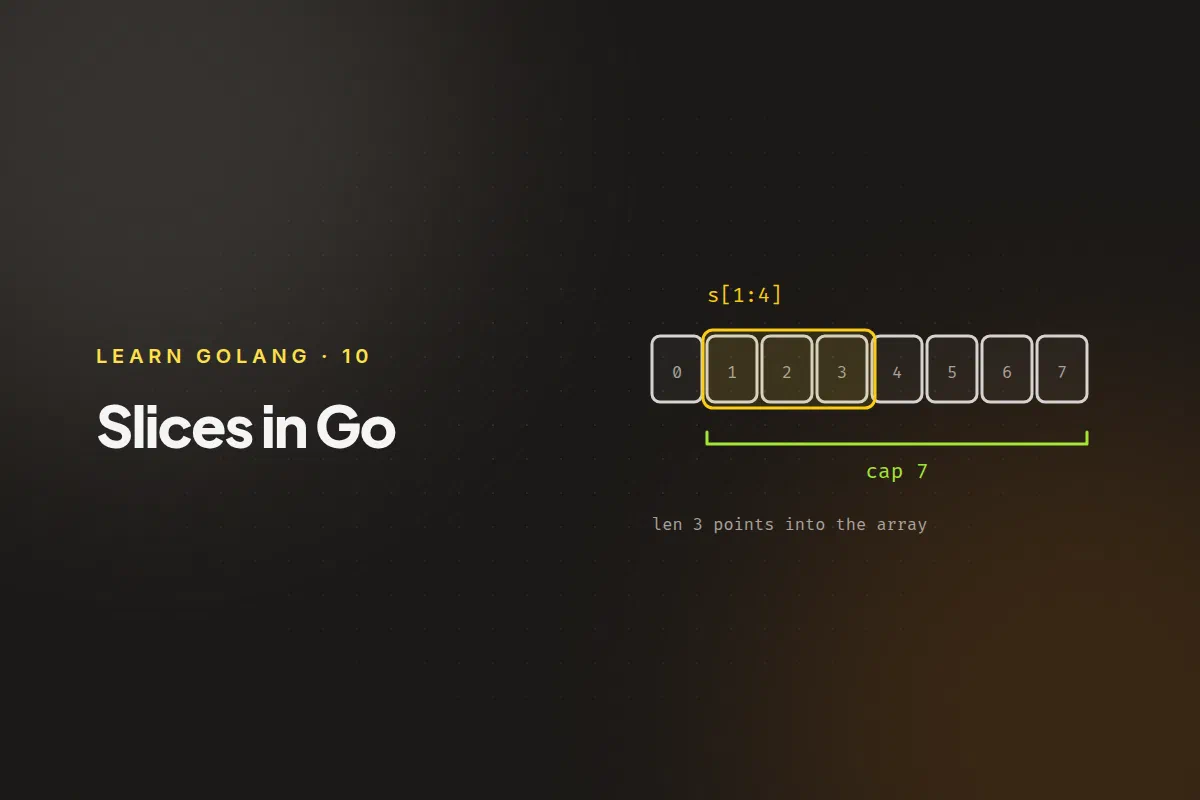
A slice doesn’t hold data itself. It’s a small description of a stretch of an underlying array, made of three things:
- a pointer to the first element it can see,
- a length: how many elements it currently has (
len), - a capacity: how many elements it could have before it runs out of room in the underlying array (
cap).
s := make([]int, 5, 8)
fmt.Println(len(s), cap(s))
5 8make([]int, 5, 8) allocates an array of 8 integers and returns a slice that can see the first 5. You can grow the slice up to 8 elements without allocating again.
 array:   [ 0 | 0 | 0 | 0 | 0 | 0 | 0 | 0 ]
            ^                   ^           ^
         pointer             len = 5     cap = 8
The capacity is never smaller than the length.
Creating slices #
var nothing []int            // nil slice: len 0, cap 0
empty := []int{}             // empty, non-nil
nums := []int{1, 2, 3}       // from a literal
made := make([]int, 0, 10)   // empty, with room for 10
A nil slice is valid and safe to use. len(nothing) is 0, you can range over it, and you can append to it. In most code you don’t need to treat nil and empty differently.
Slicing #
You take part of an array or slice with s[low:high]. It includes low and excludes high:
numbers := []int{1, 2, 3, 4, 5}

fmt.Println(numbers[1:3]) // [2 3]
fmt.Println(numbers[:3])  // [1 2 3]
fmt.Println(numbers[3:])  // [4 5]
Slices share memory #
Slicing doesn’t copy anything. The new slice points into the same array, so a change through one slice is visible through the others:
names := [4]string{"John", "Paul", "George", "Ringo"}
a := names[0:2]
b := names[1:3]

b[0] = "XXX"

fmt.Println(names) // [John XXX George Ringo]
fmt.Println(a)     // [John XXX]
b[0] and a[1] are the same element of names. The length and capacity of a sliced slice depend on where it starts: b has length 2 and capacity 3, because it can reach from index 1 to the end of the array.
Appending #
append adds elements to the end and returns the resulting slice. You must keep the return value:
s := make([]int, 0, 2)
s = append(s, 1, 2)
fmt.Println(len(s), cap(s)) // 2 2

s = append(s, 3) // no room left: Go allocates a bigger array and copies
fmt.Println(len(s), cap(s)) // 3 4
When a slice is full, append allocates a new, larger array, copies the elements across, and returns a slice that points to it. The growth is the runtime’s decision. For small slices it’s typically a doubling, which is why the capacity went from 2 to 4 here. Don’t write code that depends on the exact numbers.
To add one slice to another, spread it with ...:
a := []int{1, 2}
b := []int{3, 4}
a = append(a, b...)
fmt.Println(a) // [1 2 3 4]
The aliasing trap #
Because slices share memory, append can change data you didn’t expect. If the slice still has spare capacity, append writes into the existing array instead of making a new one:
a := []int{1, 2, 3, 4}
b := a[:2]         // length 2, capacity 4
b = append(b, 99)  // fits in the capacity, so it overwrites a[2]

fmt.Println(a) // [1 2 99 4]
fmt.Println(b) // [1 2 99]
Whenever two slices might share an array, and you append to one of them, assume the other can change. If you need an independent slice, copy it.
Copying #
copy(dst, src) copies elements and returns how many it copied, which is the smaller of the two lengths. The destination must already have room:
src := []int{1, 2, 3}
dst := make([]int, len(src))
n := copy(dst, src)

dst[0] = 100
fmt.Println(n, src, dst) // 3 [1 2 3] [100 2 3]
Now dst has its own array, so changing it leaves src alone.
Removing an element #
There’s no built-in remove. The usual idiom joins the part before the element to the part after it:
s := []int{10, 20, 30, 40}
i := 1
s = append(s[:i], s[i+1:]...)
fmt.Println(s) // [10 30 40]
This reuses the original array, so it shifts the later elements down in place. In Go 1.21 and later, the slices package also provides slices.Delete, slices.Contains, slices.Sort and other helpers so you don’t have to write these by hand.
Slices and functions #
When you pass a slice to a function, the function gets a copy of the slice header (pointer, length, capacity), not a copy of the elements. So the function can change the elements the caller sees, but it can’t change the caller’s length. If a function appends, return the new slice and have the caller assign it.
Next: maps.